범위 효과
범위 효과 (AoE) is:
- a property of attacks that determines in what area it can hit targets (hitbox).
- a property of targets that determines in what area it counts attacks as hitting it (hurtbox).
- a property of abilities that determines in what area it detects targets (예시: Bennett Inspiration Field).
좌표계
Evilsim is using a 2D coordinate system that follows the Cartesian coordinate system. That means every point in space can be uniquely identified by a combination of its x and y coordinate values.
Evilsim uses meters (m) as its unit of length.
Some abyss floors have tiles. 예를 들어: Floor 7 and 8. These tiles have a size of 2.55m x 2.55m.
방향
Evilsim represents the (viewing) direction of the player and shapes by using vectors. 형태 are oriented according to the direction starting from their center.
Usually, the direction of a shape is based on the direction of the player. The player direction is always set to the direction of the closest enemy (primary target). In order to achieve this, it updates on the following events:
- player is moved
- enemy is moved
- primary target dies
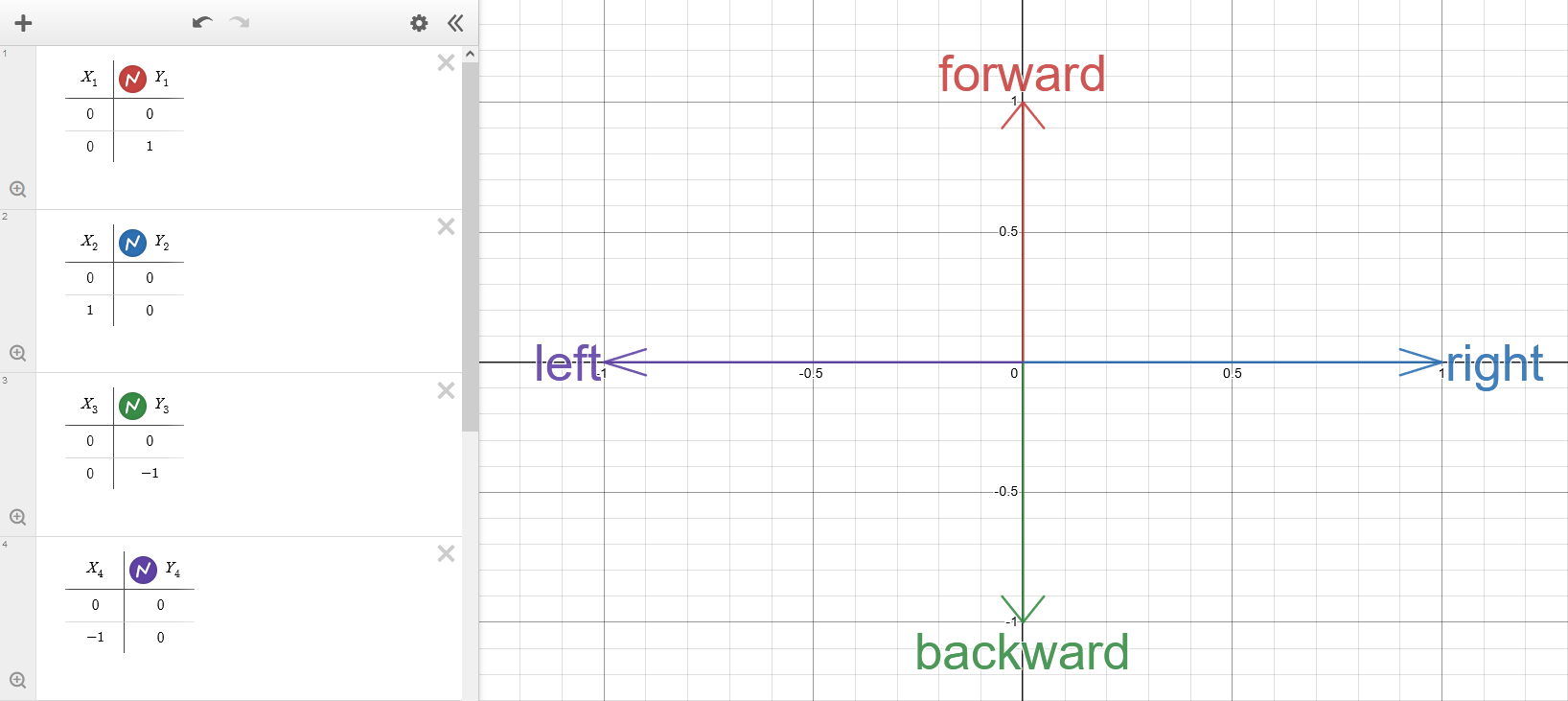
Each (x, y) vector can be mapped to a certain angle.
예시 directions and their mappings:
| 방향 | Angle | 설명 |
|---|---|---|
| (0, 1) | 0° | "looking forward", 기본값 direction |
| (1, 0) | 90° | "looking to the right" |
| (0, -1) | 180° | "looking backward" |
| (-1, 0) | 270° | "looking to the left" |
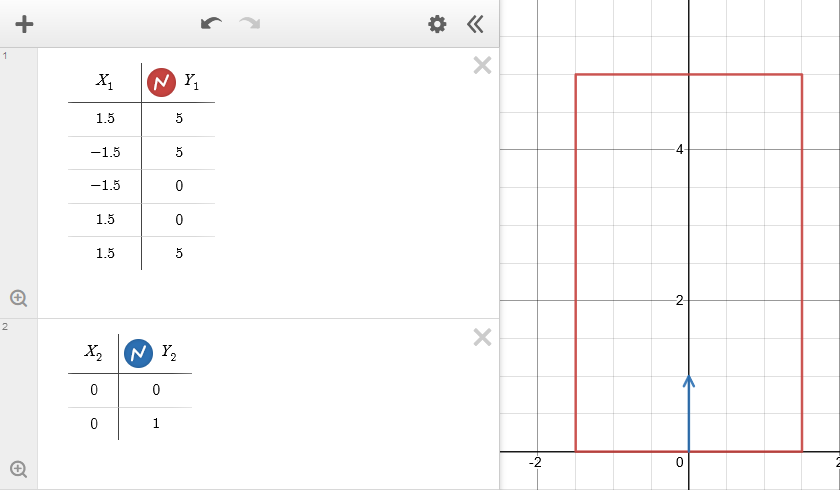
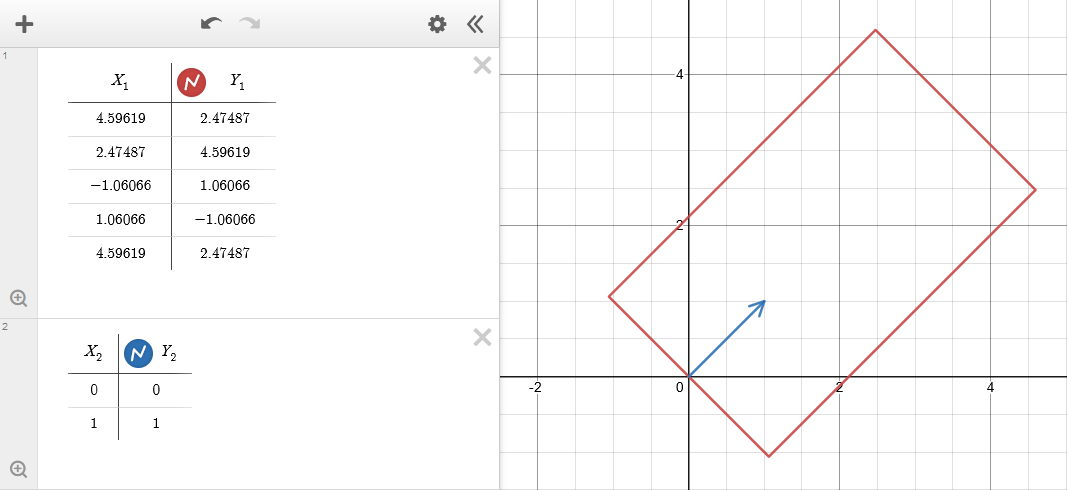
예시 for a 3m x 5m rectangle with the center at (0, 0) and a direction of (1, 1) (45°):
Before rotation by direction:
After rotation by direction:
For some manual rotation calculations for shapes that have their center at (0, 0), you can use this website.
공격 판정, hurtbox and detection area
The AoE of an attack (hitbox) and AoE of a target (hurtbox) is represented by their shape in combination with a direction.
The player has a 원형 hurtbox with 0.3m radius.
대상s have a 원형 hurtbox with 1m radius by 기본값. See the config page in the reference section for information on how to customize the radius.
In the case of a detection area, only the center point of the hurtbox matters and it has to be in that detection area.
형태
Here is a list of shapes that is used in Evilsim:
| 형태 | 설명 | Attributes |
|---|---|---|
| Single대상 | This means the attack is hitting a single enemy directly. | Enemy Key |
| 원형 | A circle with a certain radius. If the circle has a fan angle, then it becomes a circular segment. | 중심, X 오프셋, Y 오프셋, 반경, 부채꼴 각도 |
| 박스 | A 2D box (rectangle) with a certain width and length. | 중심, X 오프셋, Y 오프셋, 박스 X (width), 박스 Y (length) |
Evilsim is implemented entirely in 2D, but Genshin is a 3D game. This means we have the following mappings between 3D and 2D shapes:
| 3D shape | 2D representation |
|---|---|
| Sphere | 원형 with same radius. |
| Cylinder | 원형 with same radius. |
| 박스 | Rectangle with same width and length. |
중심
Every shape except for Single대상 has a point that defines its center.
Usually, it is the position of the player or an enemy.
While circles and circular segments in Evilsim have the usual center definition, rectangles have their center not in their geometric center, but in the middle of the lower side defined by the 박스 X parameter.
Offset
The center point of every shape can be shifted by a certain amount in the x direction (X 오프셋) and/or y direction (Y 오프셋).
The values for X 오프셋 and Y 오프셋 assume a direction of (0, 1) (0°), so they get rotated to match the shape's direction.
Most attacks do not have X 오프셋, but they usually have Y 오프셋.
Fan angle
The fan angle of a circle describes a circular segment. It is a value between 0° (single line) and 360° (full circle). As the value increases, the Circular segment expands 1:1 counterclockwise and clockwise beginning from the circle's direction.
충돌
Evilsim performs collision detection between the attack's hitbox and target's hurtbox. If Evilsim detected a collision, then the attack hits the target. For more details, please refer to the Evilsim 소스 코드.